 Miosbot
 for Mac · Preorder now · Arrives November 27
Your assistant. Your operator. Your Miosbot.
Miosbot answers your calls, texts, emails and Slack as you, keeps your money in order, and runs the busywork for your life and your business, from the inbox to the dealership desk. On the Mac it gets the full workspace: one strong composer, your projects and tasks, and work that keeps going until it’s done.
The download is for Miosbot account holders: sign in with Google to get it. Everyone else, preorder now; Miosbot arrives on Black Friday, November 27.
A tour of the app
Everything has a place.
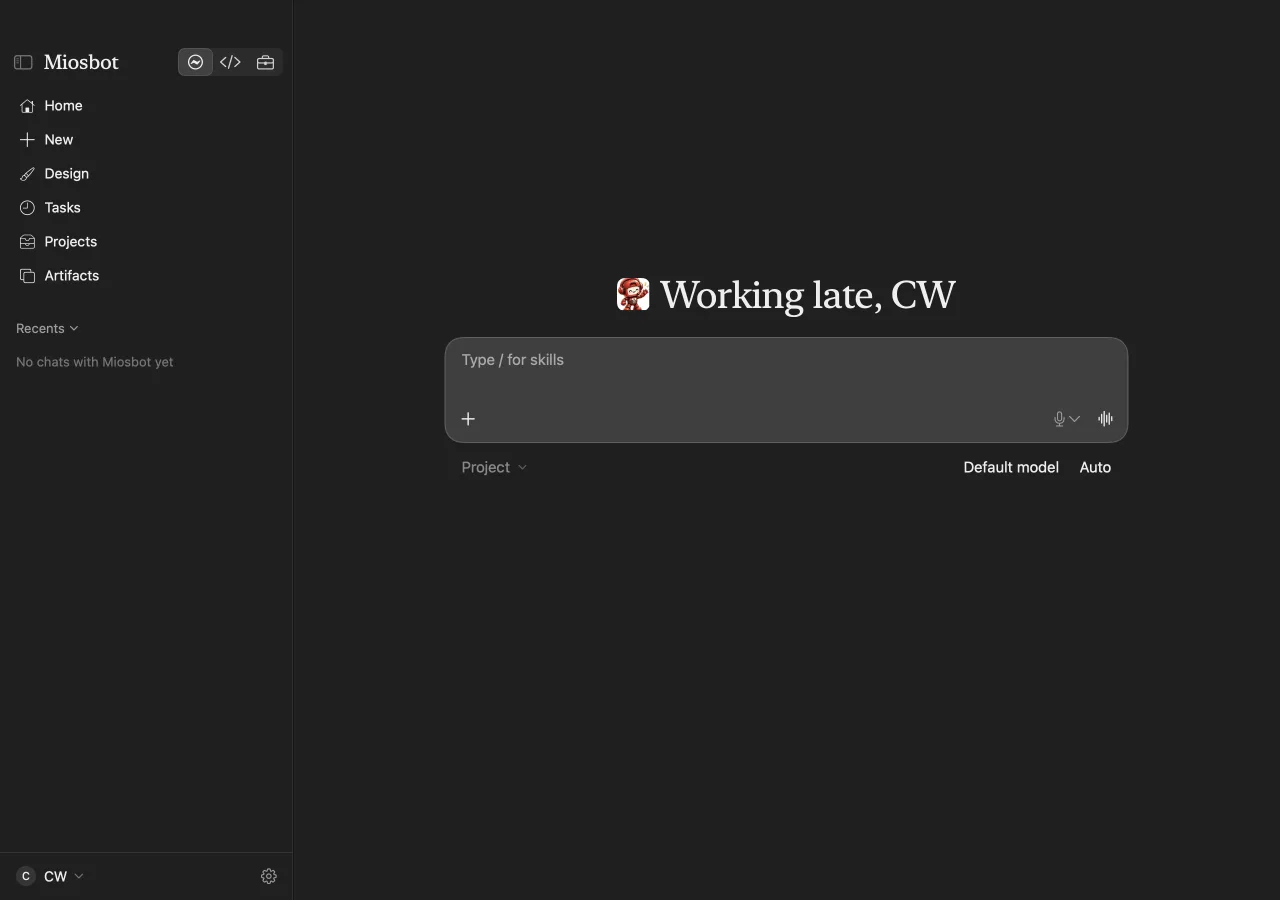
The window has three parts: the sidebar on the left, the open floor in the middle and the composer. Miosbot’s name sits at the top of the sidebar; click it to switch profiles.
Home and New
Home greets you with the composer. Type / for skills, attach files, talk instead of typing, and pick the model and mode right under the composer.
Tasks, Projects and Artifacts
Put recurring work on a schedule, group work into projects, and keep the documents, pages, images and videos Miosbot makes.
Recents
Every chat with Miosbot, ready to pick up where you left off.
Profiles
One agent, three ways to work.
Switch from the title menu or with ⌃⌘2 and ⌃⌘3. The pages change with the profile; the memory and rules stay the same.
Miosbot
Your day: research, drafts, plans and follow-ups, across SMS, email, Slack, iMessage and voice calls.
Miosbot Code
Coding jobs from an issue or a chat message, ending in a draft pull request. It never merges on its own.
Miosbot Auto
For dealerships: Deals & Funding, Vehicles, Investigate, Reports and an action plan.
Models and privacy
Bring the model. Keep your data.
Miosbot is not tied to one AI company. The gateway sits between Miosbot and the models, so you choose where the thinking happens.
Your key or your account
Sign in with a provider account, or paste an API key into the protected key field. Keys stay out of conversations.
Local models
Run a model on your own Mac or server. Privacy routing keeps private work on your machine.
Images and video
Ask for an image or a short video in chat and approve it before it goes anywhere.
Permission modes
Set it once. No allow, allow, allow.
| Mode | What it does | Stops to ask |
|---|---|---|
| Auto | Works on its own and pauses before money or client sends. | Before it spends money or sends something to a client |
| Bypass | Carries out clear instructions in full. | Never; hard limits still apply and refusals are logged |
| Run until complete | Bypass rules, and it keeps going turn after turn. | Never, until the job is done |
Hard limits are a short list of actions no mode allows. They are refused, logged, and the run carries on. See Safety and control.
Made for macOS
The shortcuts you’ll use every day.
| Keys | What happens |
|---|---|
| ⌃⌘2 · ⌃⌘3 | Switch to Miosbot Code or Miosbot Auto |
| ⌃⌘0 | Open All Agents, with the custom agents you add |
| / | Pick a skill in the composer |
| Return | Send; while Miosbot works, your message waits its turn |
| Esc | Stop the current run |
Questions about the Mac app
How do I get the Mac app?
The download isn’t public. If you have a Miosbot account, sign in with Google to download it. Otherwise, preorder Miosbot; it arrives on Black Friday, November 27, 2026.
Which Macs does it run on?
Apple silicon Macs. Requirements are shown when you sign in to download.
Do I need my own AI provider account?
You need a model route: a provider account or API key you connect through the gateway, or a local model your Mac can run.
Is there an iPhone and Watch app?
Yes. Miosbot for iPhone, Apple Watch and the web arrives with the Mac app on November 27. See every device.
Preorder Miosbot now.
Download on Black Friday, November 27. The captures on this page are real, from the Miosbot Mac app, November 2026. No provider partnership is implied.